
Capitalized assets, governed from approval to retirement.
Register capitalized assets with tag, site, project and financial values, approve full or partial capitalization, and retire assets under control.
- Full and partial capitalization
- Approval flow
- Field locking
- Retirement rules
Control what changes once an asset is on the books.
Asset register
Hold tag, site, project, financial values and a parent and child hierarchy for each asset.
Full and partial capitalization
Full capitalization requires the capitalized value to equal acquisition cost. Partial capitalization records a lower value.
Approval flow
Records are submitted, then approved or rejected by a user with the approver role.
Field locking
After capitalization, only operational fields stay editable. Financial values are protected.
Retirement
An asset can be retired only once it is decommissioned and has no active child assets.
Dashboard
See what is pending approval, warranties about to expire, faulty assets and breakdowns by class and site.
What it looks like.
Capitalized assets at a glance.
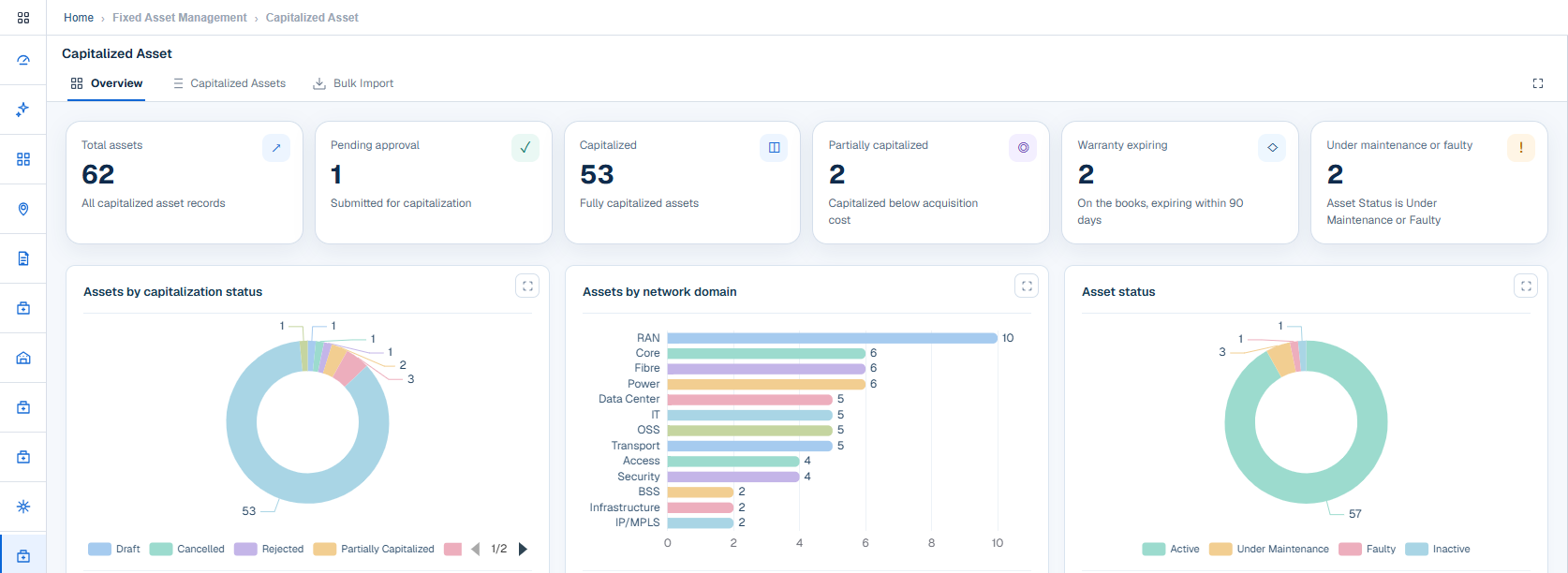
See what is pending approval, what is fully or partially capitalized, which warranties expire within 90 days and which assets are faulty or under maintenance.
- Capitalization status breakdown
- Warranty expiring
- Asset status: active, under maintenance, faulty, inactive
A clear status from draft to retired.
Draft
The record is being prepared.
Submitted
Waiting for approval.
Partially capitalized
Part of the cost is capitalized.
Capitalized
The full cost is capitalized.
Retired
The asset is closed.
Submitted records can also be rejected, and drafts can be cancelled.
One record for both views of the asset.
Finance sees value. Operations sees condition and lifecycle. Both read the same record.
- Lifecycle: installed, commissioned, in service, out of service, decommissioned
- Asset status: active, under maintenance, faulty, inactive
- Net book value derived from cost and accumulated depreciation
- Owned or leased ownership type
- Data import with templates
- Audit and status history
Connected modules.
CWIP Assets
Capital work in progress per project, from budget and spend through to capitalization approval.
Fixed Asset Register
Booked entries detailed under maker-checker approval and reconciled against network, warehouse and contract records.
Finance flow
From project spend to a reconciled register.
See Capitalized Assets with your own data.
We will walk through this module on a workflow that matters to your organization.